Image Label Generator
Image Label Generator
Methodology
Methodology
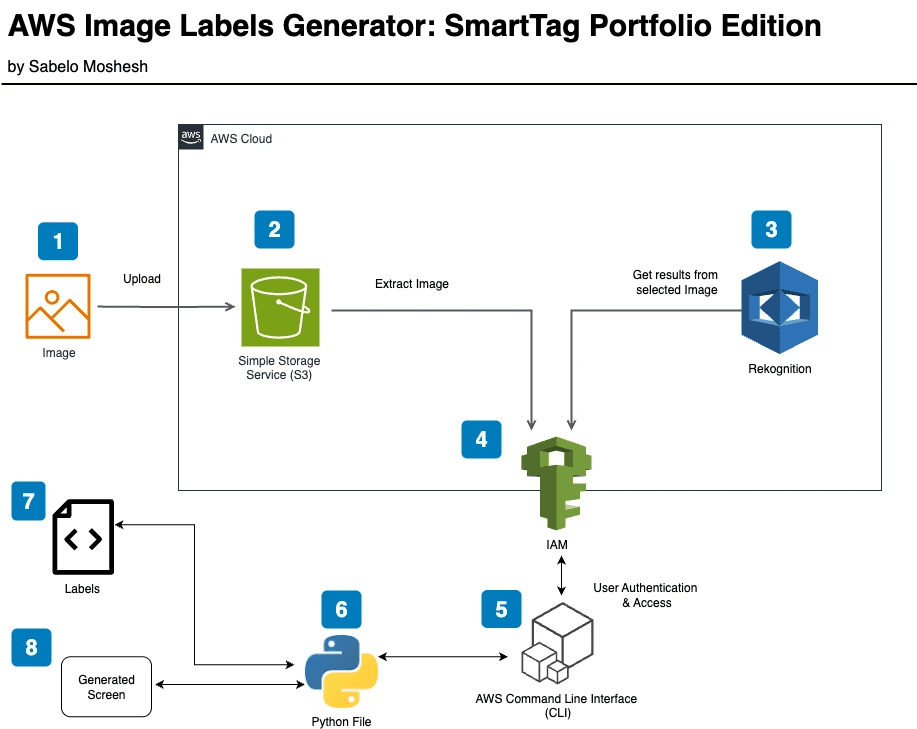
1. I start by uploading my chosen image file to a dedicated Amazon S3 bucket set up just for this project
2. The image stored in S3 acts as the main data source for my label detection workflow
3. I use Amazon Rekognition to analyze the image directly from S3, which returns a list of detected labels and their confidence scores
4. IAM is configured to manage secure access, so only my authenticated scripts can interact with S3 and Rekognition
5. I use AWS CLI commands to trigger Rekognition and automate tasks from my terminal, making it easy to run multiple images
6. My Python script handles downloading the results from Rekognition, processing the label data, and organizing it for display
7. The script outputs a list of all detected labels with their confidence levels for easy review
8. Finally, I generate a pop-up window that displays the organized labels around the image, making the results visual and interactive
1. I start by uploading my chosen image file to a dedicated Amazon S3 bucket set up just for this project
2. The image stored in S3 acts as the main data source for my label detection workflow
3. I use Amazon Rekognition to analyze the image directly from S3, which returns a list of detected labels and their confidence scores
4. IAM is configured to manage secure access, so only my authenticated scripts can interact with S3 and Rekognition
5. I use AWS CLI commands to trigger Rekognition and automate tasks from my terminal, making it easy to run multiple images
6. My Python script handles downloading the results from Rekognition, processing the label data, and organizing it for display
7. The script outputs a list of all detected labels with their confidence levels for easy review
8. Finally, I generate a pop-up window that displays the organized labels around the image, making the results visual and interactive
1. I start by uploading my chosen image file to a dedicated Amazon S3 bucket set up just for this project
2. The image stored in S3 acts as the main data source for my label detection workflow
3. I use Amazon Rekognition to analyze the image directly from S3, which returns a list of detected labels and their confidence scores
4. IAM is configured to manage secure access, so only my authenticated scripts can interact with S3 and Rekognition
5. I use AWS CLI commands to trigger Rekognition and automate tasks from my terminal, making it easy to run multiple images
6. My Python script handles downloading the results from Rekognition, processing the label data, and organizing it for display
7. The script outputs a list of all detected labels with their confidence levels for easy review
8. Finally, I generate a pop-up window that displays the organized labels around the image, making the results visual and interactive